スコア
24
Advertisement

C:\Users\kuba>netsh wlan show interfaces

There is 1 interface on the system:

    Name : Wireless Network Connection 2
    Description : DW1520 Wireless-N WLAN Half-Mini Card
    State : connected
    Network type : Infrastructure
    Radio type : 802.11g <-- the currently negotiated value
    Authentication : WPA-Personal
    Cipher : CCMP
    Connection mode : Auto Connect
    Channel : 11
    Receive rate (Mbps) : 54
    Transmit rate (Mbps) : 54
    Signal : 82%
    Profile : xxxx

    Hosted network status : Not started
解決策が見つかりました
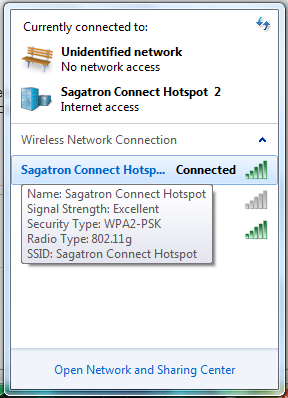
ネットワークと共有センター」に移動し、「アダプタ設定の変更」を選択します。ワイヤレスアダプタを右クリックし、「ステータス」をクリックします。そこのどこかに、Wireless-N、Wireless-Gなどを使用しているかどうかが記載されているはずです。
Windows 7 では、ステータスボックスはポップアップしないようですが、接続リンクの上にマウスを置くと、n にある場合は 802.11n と表示されます。